GuidesQR-bills and contributions
Create a QR-bill: step by step, also for clubs and groups
A QR-bill needs few details, but the right ones. Here you see what goes in, which reference suits your account, what changes in 2026 and how to make one for every member at once.
Only for people who live in Switzerland.For information. This guide follows Swiss law and Swiss rules. It may contain errors or be out of date: always check the official sources and, if in doubt, ask an official service for help. Not financial, tax or legal advice; for fees and e-banking features, your bank's information applies.
What does a QR-bill contain?
It is the Swiss payment standard. Below the invoice comes a tear-off part: the receipt and the payment section with the Swiss QR Code, which the payer scans in e-banking.
- 1AccountIBAN or QR-IBAN, from CH or LIRequired
- 2PayeeName and address of the account holderRequired
- 3ReferenceDepends on the account (see below)Depends
- 4MessageFree text, up to 140 charactersOptional
- 5PayerName and addressOptional
- 6CurrencyCHF or EURRequired
- 7AmountCan be left blankOptional
- 8Swiss QR CodeHolds all this data; has the Swiss cross in the centreRequired
IBAN or QR-IBAN?
The account decides which reference the QR-bill can have.
The account the association already has.
SCORReference starting with RF, 5 to 25 charactersNONNo reference, with a message
Issued by the bank. It has an institution number (QR-IID) between 30000 and 31999.
QRRQR reference with 27 digits, mandatory
You don't need a QR-IBAN. With a regular IBAN, the QR-bill comes out with a SCOR reference or no reference. A QR-IBAN is only for receiving, and your regular IBAN stays as it is.
The rules, from 2020 to 2027
- The QR-bill arrives
- The old payment slips end
- Version 2.3Structured address only: street, number, postcode and town in separate fields
- Version 2.4In CHF nothing changes. In EUR, only SCOR or no reference
- End of version 2.3
Create a QR-bill: the 6 steps
- The account detailsIBAN, name and address of the account holder, in separate fields.
- The referenceSCOR or none with a regular IBAN; QRR with a QR-IBAN.
- Amount and payerBoth are optional. With the amount, the payment comes pre-filled.
- The messageFor example "Annual fee 2027" or "Lift maintenance".
- The payment sectionA program or an app generates the Swiss QR Code to the SIX standard.
- Check and sendAs a PDF by email, or printed on white, perforated paper.
According to those who sell them, Excel or Word templates include the invoice but not a valid payment section. It is done in two parts:
SIX has a validation portal for the Swiss QR Code, for software makers and for invoice issuers. It requires registration.
One QR-bill per member, all at once: association, condominium, group
The same expense to split among many people: the lift in the condominium, the club fee, the holiday camp, the group trip. Each person needs their own QR-bill with the right share. And then you want to know who has paid.
- One expenseWith a photo of the receipt
- Split by sharesEqual parts, % or ‰, to the cent
- One QR-bill per memberAll in one PDF
- Who has paidYou mark it; you resend only to those who are missing
That is what QR Quota is for, an app for iPhone. It starts from the group, not from a single invoice.
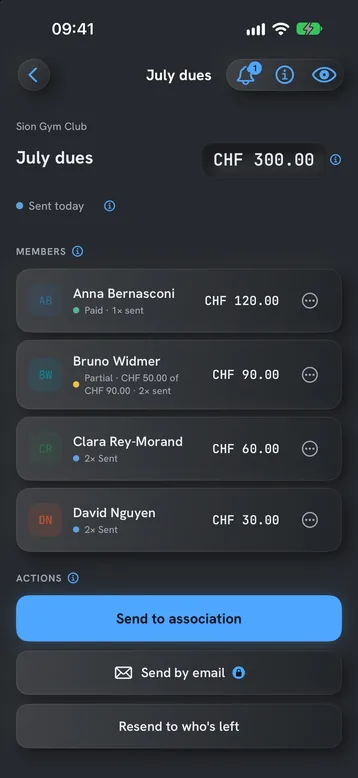
- Per mille shares, as in a condominiumOr equal parts, or percentages. For fixed fees, an amount per member.
- To the centThe parts always add up to the total.
- Fees that repeatMonthly, quarterly, half-yearly or yearly. The app prepares the next send on time.
- SCOR or QRR, no searchingWith a regular IBAN it uses SCOR; with a QR-IBAN it switches to QRR. It follows the Swiss Payment Standards (IG v2.3).
- Members don't need the appThey pay the PDF in e-banking, like any QR-bill.
- The data stays on the iPhoneNo account. The app does not talk to your bank: you mark who has paid.
Free for one association with up to two members and three active expense reports, no time limit. You can try Pro free for 14 days; then you choose weekly, yearly or a one-time payment, for life. The price is in the App Store.
Download QR Quota for iPhone. One QR-bill per person, each with its own reference, sent from your own email. Free to start, no account.

Frequently asked questions
Can you create a QR-bill for free?
The standard is public: SIX makes the IG available to download, with no licence. Whether a tool costs money depends on who makes it. QR Quota is free for one association with up to two members, with no time limit.
Do you need a QR-IBAN?
No. With a regular IBAN you create a QR-bill with a SCOR reference or no reference. A QR-IBAN is only needed to use the QR reference. You ask your bank for it.
Does a QR-bill have to be printed?
No. The payment section can go as a PDF by email. According to the IG, a PDF works for paying in e-banking and mobile banking, but not at the counter. On paper, according to PostFinance, it is printed on white, perforated paper.
Can a QR-bill be in euros?
Yes, the currency can be CHF or EUR. In euros, from version 2.4 (14 November 2026), only an IBAN with a SCOR reference or an IBAN with a free-text message is valid. According to SIX, the payment section is designed for payments in Switzerland and Liechtenstein.
How do I make QR-bills for all members at once?
With a tool that starts from the group. In QR Quota you create the members once, with each one's share. Each expense then produces one QR-bill per member, with the right amount, all in one PDF.
Do members have to install an app?
No. They receive a PDF with their payment page and pay in e-banking or in their bank's app, like any other QR-bill.
About this guide. Informational content. Not financial, tax or legal advice. QR Quota is for billing in Switzerland (CHF / EUR). Updated in October 2026.
Sources (9)
- SIX: QR-bill (introduction, QR reference, QR-IBAN, SCOR), in German
- SIX: the QR-bill standard (end of payment slips, versions 2.3 and 2.4, validation portal), in English
- SIX: Swiss Implementation Guidelines for the QR-bill, version 2.3 (PDF, in English)
- SIX: Swiss Implementation Guidelines for the QR-bill, version 2.4 (PDF, in English)
- SIX: QR-IID and QR-IBAN, version 1.1 (PDF, in German)
- SIX: Swiss QR Code tools and validation portal, in English
- SIX: how to validate the Swiss QR Code (PDF, in German)
- PostFinance: QR-bill for businesses, in German
- PostFinance: paying a QR-bill (structure, prices and conditions), in German