Create a QR-bill: step by step, also for clubs and groups
The details that go in, IBAN or QR-IBAN, the 2026 rules and one QR-bill per member at once.
From one shared expense to a ready-to-pay Swiss QR-bill for every member of your condo, club or association — in the official format every Swiss bank reads. No Excel, no licence.
Free forever for one association up to 2 members — no card required. Upgrade only when you outgrow it.
The problem
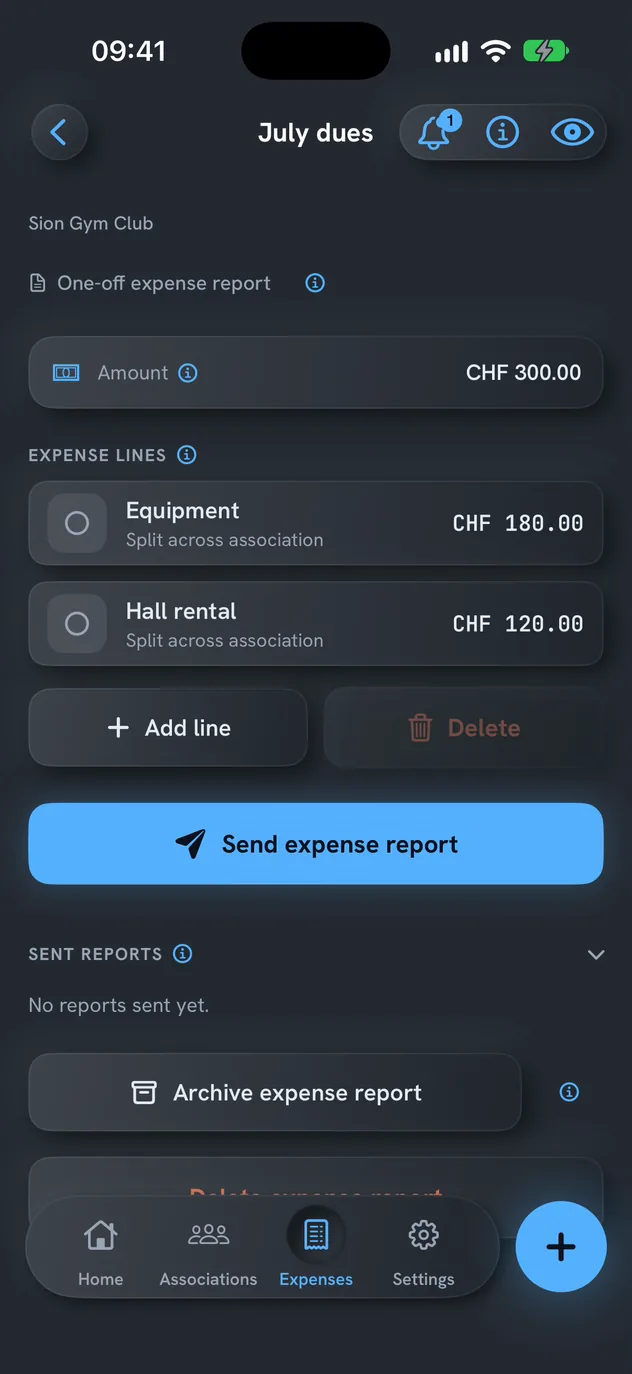
33.34 + 33.33 + 33.33 = 100.00 — down to the last cent
What you get
Every report keeps the photos of the receipts, ready to show anyone who asks where the money went.
A report that repeats: QR Quota prepares the next batch on time. Nothing goes out without you — unless you switch on automatic sending (Pro).
No account, no analytics, no server of mine. Names, amounts and receipts stay on your iPhone.
How it works
The real thing
The app picks the right reference on its own — it follows the Swiss Payment Standards (IG v2.3).
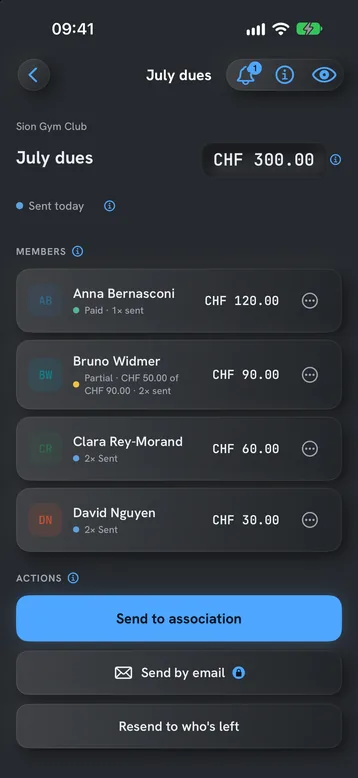
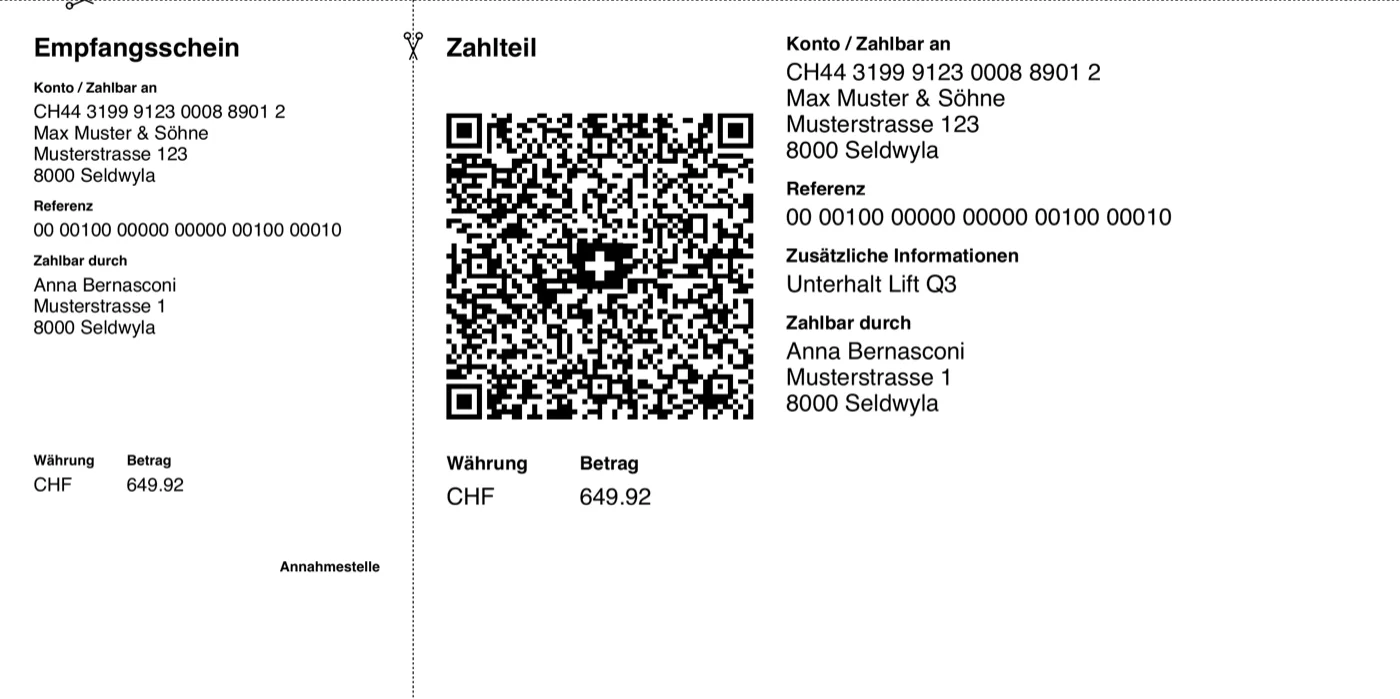
1 PDF: the cover with the report, then 1 ready-to-pay page per member.
Make it yours
Email sending
QR Quota has no email server and no sender address of its own: it sends from your account. You connect your Google account with one tap, or use an app password from your provider. That is why the app asks Google for permission — and it asks for the smallest one there is.
For one thing only: to put the QR-bill in your outbox, from your own address, so each member gets an email from their treasurer — not from an unknown sender that lands in spam.
A single send-only permission (gmail.send) and your email address, to set it as the sender. Nothing else. Connection keys stay in your iPhone's Keychain, never on a server of mine.
QR Quota does not read, list, search or delete messages. No access to your inbox, contacts, calendar or files. And nothing received from Google APIs is ever used to train AI models.
Privacy
Compliant with Swiss data protection law (revDSG).
Guides
The details that go in, IBAN or QR-IBAN, the 2026 rules and one QR-bill per member at once.
What the law and the statutes say, one QR-bill per member, email and reminder templates, and who has paid.
What Excel does well, where it falls short, a member sheet that works and three precautions that prevent errors.
Which bookkeeping to keep, the year month by month, membership fees, the accounts for the general meeting, the closing and federal tax.
Per mille shares, common charges, advance payments and year-end settlement, owners' meeting, minutes and works.
What the fund is, what each unit pays, who decides on works, and a 25-year simulator.
Categories, family discount and cap, the season month by month, who pays, the reminder and costs between teams.
What the school pays, what parents are asked, the voluntary fund, the school year and the accounts.
The camp budget, the price per child, the deposit and the balance, cancellations and the accounts.
Rent by room, ancillary costs and the settlement, the deposit, shared bills and moving out, for people who live in a flatshare.
Pricing
Free
0 CHF — forever
Pro
14 days free
After the 14 days you pick weekly or annual, or pay once and keep Pro for life. The price is on the App Store listing — in your currency and always current.

Frequently asked questions
No. The Swiss QR-bill standard (Swiss Payment Standards, Implementation Guidelines v2.3) is public and free to use. QR Quota simply generates a bill that follows it — there is no licence to buy and no contract to sign.
Yes. With a regular IBAN, QR Quota uses the SCOR reference, which works with any Swiss bank. If your association's account is a QR-IBAN, it switches automatically to the QRR reference — you don't need to configure anything.
Your association's data — members, amounts, IBAN, receipts — stays on your iPhone, and there's no analytics. There's no account to create, and no server of mine receives it.
You can make an expense report recurring — monthly, quarterly, semi-annual or yearly — and QR Quota prepares the next batch of QR-bills on time. By default nothing goes out without you: you review and send. On Pro you can switch on automatic sending for an expense report — then, on its scheduled date, QR Quota generates and emails that one as soon as you open the app.
Yes. Adding expense lines, splitting amounts and generating QR-bills all work fully offline. You only need a connection to send the PDF — from QR Quota itself, or through the app you choose.
One association with up to 2 members, 3 active expense reports with their QR-bills (archived reports don't count), and the full photo-proof archive — free, with no time limit. Pro adds unlimited associations, members and expense reports, plus recurring expense reports and automatic sending.