Print the team schedule as a PDF, from A6 to A3, to put on the wall
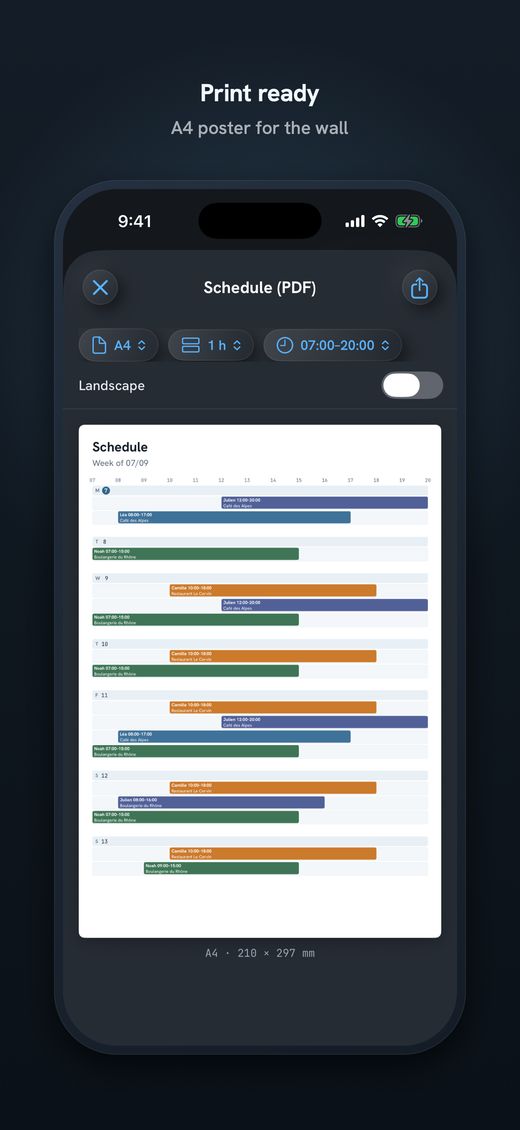
In Send Planning you open the poster, pick the day, week, month or year, then the size, from A6 to A3. You print with AirPrint from your iPhone, or save the PDF and share it. The poster is part of Pro.
Only for people who live in Switzerland.For information. This guide explains how to use Send Planning and summarises Swiss rules on work. It may contain errors or be out of date: always check the official sources (Fedlex, SECO, your canton's labour inspectorate) and, if in doubt, ask an official service for help. Not legal advice. Prices are in the App Store.
- The short answer
- Which size to choose
- Step by step
- What is on the poster
- Poster or send to each person
- The app
- Questions
Printing the team schedule as a PDF, in short
In Send Planning you open the poster, pick the day, week, month or year, then the size, from A6 to A3. You print with AirPrint from your iPhone, or save the PDF and share it.
The PDF poster is part of Pro. The subscriptions start with a 14-day free trial.
You need no computer and no Excel. The PDF is made on the iPhone, from the shifts you have already entered.
A6 to A3: which size for which wall?
The four sizes below are drawn to scale. The bigger the sheet, the more days or people fit in readable type.
A6In a pocket or on the fridge: the day, or one person's weekA5On the changing-room door or by the till: the weekA4On the board in the back room: the whole team's weekA3In the staff room, readable from far away: the month, or the year
Step by step: from iPhone to paper
Four steps. None of them asks for an account.
- Posteropen the poster from the schedule
- Periodday, week, month or year
- SizeA6, A5, A4 or A3, and the theme
- Print or shareAirPrint, or save the PDF
No AirPrint printer? Save the PDF, or share it with the iPhone share sheet, and print it somewhere else.
Pro has 9 themes for the poster; the free plan has one theme.
What is on the poster
What you see in the schedule, you see on paper: who works which day, at what times and at which site, with the days off and the repeating shifts.
- Repeating shiftsA shift that repeats is entered once and appears in every week of the poster.
- Days offThe day off shows as “Day off”. The reason stays private.
- Shift swapsAfter a swap, you print the poster again: the paper follows the schedule.
- Routes (Pro)The km and minutes for each person to the work site are worked out with Apple Maps, inside the app.
A swap changes the paper. Long-press a shift, tap “Swap shift”, then tap the other person's shift. The day, the hours and the site stay; only the people switch. Then print the poster again.
Poster on the wall or sent to each person?
Swiss labour law says the employer informs staff of the working schedule “by posting it or in another suitable way” (Art. 47 ArG, Labour Act). The poster on the wall is the classic way. Sending it to each person is another way. Posting is not required: you can do one, the other, or both.
ProsEveryone sees everything, no phone neededProsEasy to check in passingConsYou replace it after every changeConsYou do not carry it with you
ProsEach person gets only their own shifts, on their phoneProsWhatsApp, SMS, email or ShareConsEach person has to open their messageConsThe others' shifts are not in view
Mon (02/11): 07:00–15:00 (30 min break) • Café Central Tue (03/11): 07:00–15:00 (30 min break) • Café Central
✓ SentMany teams do both: the poster in the back room, and each person gets their own shifts. Both come from the same schedule, so they say the same thing.
Rules vary. Check your collective agreement (GAV/CCT/CCL) and your canton. The app helps you plan and inform; complying with the law is the employer's job.
Send Planning: the schedule and the poster, from your iPhone
Send Planning is an iPhone and iPad app. You build the schedule for your small team, send each person their shifts and print the poster. No account and no server: the data stays on your device.
Free, with no time limit, to try it out: 1 employee, 1 site, 1 repeating series, 1 theme. A real team needs Pro. The PDF poster (A6 to A3, day, week, month or year), the 9 themes, routes and unlimited employees are Pro. The subscriptions start with a 14-day free trial; you choose weekly, monthly, yearly or a one-time purchase. The price is in the App Store.

Download Send Planning for iPhone and iPad. You make the team's rota and each person gets only their own shifts, by WhatsApp, SMS or email. Free to start, no account.

Frequently asked questions
Is the PDF poster free?
No, the PDF poster is part of Pro. The free plan is for trying the app, with 1 employee and 1 site. The subscriptions start with a 14-day free trial, and the price is in the App Store.
Which sizes and periods can I print?
The sizes are A6, A5, A4 and A3. You can print the day, the week, the month or the year. Pro has 9 themes for the poster.
I have no AirPrint printer. What now?
Save the PDF or share it with the iPhone share sheet, then print it from another device or printer. The poster is an ordinary PDF file.
Do I have to post the schedule on the wall?
No. Swiss labour law says the employer informs staff of the schedule by posting it or in another suitable way (Art. 47 ArG). The poster is the classic way, sending it to each person is another. Also check your collective agreement and your canton.
What do I do with the poster after a shift swap?
After a swap the schedule changes: only the people switch, the day, hours and site stay. You print the poster again so the paper follows the schedule.
Do my employees need the app?
No. There is no app for employees. They read the poster, or they get their own shifts by WhatsApp, SMS or email, only theirs.
About this guide. Informational content. It is not legal advice: the names, the hours and the examples are made up. The article cited is from the Swiss Labour Act (ArG) and leads to the official text on Fedlex. Depending on the sector, the canton and your collective agreement, other rules may apply. This guide may contain errors or be out of date: always check the official sources. Updated October 2026.
More guides on this topic
- Cleaning: note your clients and hours on the iPhone, and send each team member her schedule, with no paper and no Excel
- Pharmacy staff schedule: the team's shifts, week by week, on your iPhone
- Send the café rota by WhatsApp – and what data protection says about it
- Restaurant schedule: lunch service, dinner service and breaks
- Announce the shift schedule in time: plan and send two weeks ahead
- Visit scheduling for small Spitex teams: visits, routes and kilometres
- Swapping shifts in a team: swap two shifts and tell everyone
- A 7-day shift schedule without Excel: repeating shifts and days off
- Staff rota for a nursery on your iPhone: start free, no computer