A 7-day shift schedule without Excel: repeating shifts and days off
You create a shift once and choose how it repeats: every day, every week, every 2 weeks, every month or every year. Days off are marked from day to day and the message only says «Day off». That way a 7-day schedule takes a few minutes.
Only for people who live in Switzerland.For information. This guide explains how to use Send Planning and summarises Swiss rules on work. It may contain errors or be out of date: always check the official sources (Fedlex, SECO, your canton's labour inspectorate) and, if in doubt, ask an official service for help. Not legal advice. Prices are in the App Store.
- Repeating a shift
- The repeat options
- Week A and B
- Days off
- Seven days and the law
- The app
- Before you send
- Questions
How do you repeat a shift without retyping it every week?
You create the shift once and pick a repeat: every day, every week, every 2 weeks, every month or every year. The app creates the following shifts on its own, up to 12 weeks ahead.
It is the fastest way to build a 7-day schedule. The bar with the same opening every Saturday, the bakery with the morning shift from Monday to Friday: you write it once and the rest fills in.
- Create the shiftPerson, place, hours, break
- Pick the repeatDay, week, month or year
- The app creates the next onesUp to 12 weeks ahead
- Send each person theirsWhatsApp, SMS or email
The five repeat options, and the optional end
In the shift, the «Repeat» section offers these choices.
DailyEvery day, for example breakfast in a small hotelWeeklyYou choose the days of the week: Monday, Wednesday and Friday. With no days chosen, it repeats on the same weekday as the shiftEvery 2 weeksOne Saturday yes, one no, or week A and week BMonthlyOn the same day of the month, for example a delivery or a deep cleanYearlyOnce a year, like the end-of-season stocktakeEnds onThe end date is optional. With no date, the series carries on until you stop it
An example with the every-2-weeks option. Rui works every other Saturday and has three days off at the end of the month.
Week A and week B: how to set up a rotation
For a rotation, the every-2-weeks option is enough. You create one series for Lea that starts in week 2 and one for Rui that starts in week 1: every 2 weeks, one of the two has the weekend.
In the example, Ana has a weekly series from Monday to Friday. Rui and Lea each have an every-2-weeks series for Saturday and Sunday, one week apart. That is three series: a real team needs Pro, because the free plan has only one.
Sunday. Work on Sundays is generally prohibited (Art. 18 ArG), with exceptions. Before you put someone on a Sunday, check whether an exception applies in your case.
Days off, from day X to day Y
To mark that someone is not working, choose «Off» under «+» and set the first and last day, both included. It works for holidays, illness, an appointment or a free day. If there is already a shift on those days, the app warns you.
The team member does not get a shift line: on free days they get just «Day off». This is the message that reaches Rui.
Mon (02 Nov): Day off Tue (03 Nov): 11:00–19:00 (30 min break) • Gelateria Alba Wed (04 Nov): 11:00–19:00 (30 min break) • Gelateria Alba
✓ SentThe reason stays with you. The reason for an absence is private and never goes in the message. The person only sees «Day off».
Opening seven days is not working seven days
The shop can open 7 days out of 7, but each person has limits. A few points of the Swiss Labour Act (ArG) that matter when you build the schedule.
Art. 21If the working week has more than 5 days, at least a half day off is needed (except weeks with a public holiday off). With the person's agreement, half days can be grouped over up to 4 weeksArt. 18Sunday work (from 23:00 on Saturday to 23:00 on Sunday) is prohibited, except for the exceptions in Art. 19 ArGArt. 15aA daily rest of at least 11 consecutive hours. For adults it can drop to 8 hours once a week, if the average over 2 weeks is 11 hoursArt. 69Employees are consulted when duty rosters are drawn up and informed as early as possible. As a rule two weeks before a service with a new schedule (Art. 69 ArGV 1)
Many sectors have their own rules, for example hotels and restaurants with the collective agreement (L-GAV), healthcare, or shops with cantonal opening hours. Check your collective agreement and your canton. The calculator below is only a reminder.
Working days in one week
- Working days
- Days without work
- Hours in the week
More than 5 days: at least a half day off is needed that week (Art. 21 ArG), with exceptions. Check your collective agreement too.
Up to 5 working days: the half-day rule of Art. 21 ArG does not apply. The other rules remain, like the 11-hour rest.
Above 45 hours. The maximum weekly working time is 45 or 50 hours depending on the sector (Art. 9 ArG): check which one applies to you.
The app helps you plan and inform. The employer is the one who must comply with the law. The schedule shows the weeks and the days off; you know the rules of your own contract.
How Send Planning does it
Send Planning is an app for iPhone and iPad. You build the 7-day schedule, repeat shifts, mark days off and send each person only their own shifts.
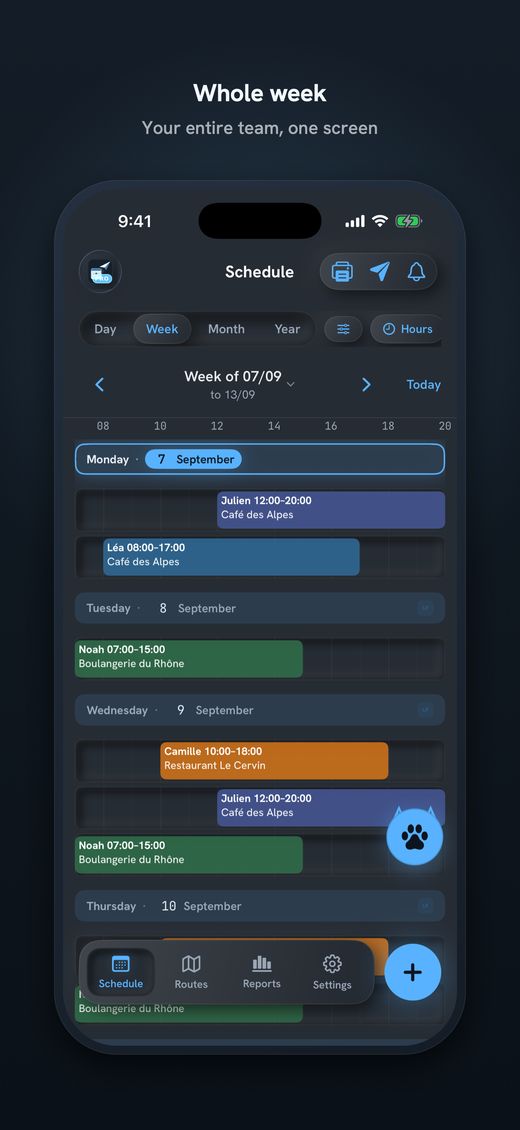
- Repeating seriesDaily, weekly with the days you choose, every 2 weeks, monthly or yearly. The end is optional.
- Days off, from day to dayThe reason is private. The message only says «Day off».
- Each person gets their ownBy WhatsApp, SMS, email or Share. Text, image or .ics file (email and Share).
- Routes (Pro)Kilometres and minutes from home to the workplace, with Apple Maps.
- PDF poster (Pro)The day, week, month or year in A6, A5, A4 or A3, to pin up in the shop.
- Your data stays on your iPhoneNo account. It works without a network, except to send.
Free, with no time limit: 1 team member, 1 place and 1 series, to try it out. A real team needs Pro, with unlimited team members, places and series, routes, the PDF poster and no brand line in the message. Subscriptions start with 14 days free. The price is in the App Store.
Before you send the schedule
If someone cannot do a shift, do not rewrite the schedule: hold your finger on the shift, choose «Swap shift» and tap the other person's shift. Only the people change; the day, hours and place stay the same.
If the shift was already sent, the person who loses it gets a notice in the next send.
A quick list before you press send.
- Each person has their day off. Check that the day off is marked, not just «no shift».
- Nobody works more than 5 days unchecked. With 6 or 7 days a half day off is needed (Art. 21 ArG).
- There are 11 hours between one shift and the next. For example after the evening closing and before the morning opening.
- The series have the right end date. A series with no end carries on. Set an end if the rotation changes.
- Sunday is allowed in your case. Otherwise you need an exception (Art. 18 and 19 ArG).
- You warned people in time. New schedules, as a rule, two weeks ahead (Art. 69 ArGV 1).

Download Send Planning for iPhone and iPad. You make the team's rota and each person gets only their own shifts, by WhatsApp, SMS or email. Free to start, no account.

Frequently asked questions
How do I repeat a shift every week in Send Planning?
In the shift, open the «Repeat» section and choose Weekly. You can pick the days of the week, for example Monday, Wednesday and Friday, and an optional end date. The app creates the following shifts on its own, up to 12 weeks ahead.
Can I set up a week A and week B rotation?
Yes, with the every-2-weeks option. You create one series for a person who starts in week 1 and one for another who starts in week 2. With several series you need Pro: the free plan has only one.
How do I mark holidays or a day off?
Under «+», choose «Off» and set the first and last day, both included. The reason is private and never goes in the message: the person only receives «Day off». If there is already a shift on those days, the app warns you.
How many series can I create for free?
The free plan, with no time limit, has 1 team member, 1 place and 1 series. It is for trying the app. A real team needs Pro, which has unlimited series, team members and places. Subscriptions start with 14 days free.
Does the law allow working seven days in a row?
Under the Swiss Labour Act, if the working week has more than 5 days, at least a half day off is needed (Art. 21 ArG), and Sunday work is prohibited with exceptions (Art. 18 and 19 ArG). Many sectors, such as restaurants, have their own rules: check your collective agreement and your canton.
What happens if I change a shift that was already sent?
If you move a shift that was already sent, the next message carries a note with the old and the new shift. With «Swap shift» only the people change: the person who loses the shift gets a notice in the next send.
About this guide. Informational content, not legal advice. The examples, names, hours and businesses are invented. The articles cited are those of the Swiss Labour Act (ArG) and its Ordinance 1 (ArGV 1); each one links to the official text on Fedlex, which is in German. Many sectors have their own rules: check your collective agreement and your canton. This guide may contain errors or be out of date: always check the official sources. Updated in October 2026.
More guides on this topic
- Cleaning: note your clients and hours on the iPhone, and send each team member her schedule, with no paper and no Excel
- Pharmacy staff schedule: the team's shifts, week by week, on your iPhone
- Send the café rota by WhatsApp – and what data protection says about it
- Restaurant schedule: lunch service, dinner service and breaks
- Print the team schedule as a PDF, from A6 to A3, to put on the wall
- Announce the shift schedule in time: plan and send two weeks ahead
- Visit scheduling for small Spitex teams: visits, routes and kilometres
- Swapping shifts in a team: swap two shifts and tell everyone
- Staff rota for a nursery on your iPhone: start free, no computer