Cleaning: note your clients and hours on the iPhone, and send each team member her schedule, with no paper and no Excel
A cleaning schedule says who goes to which client, on which day, and from what time to what time. On the iPhone you note each client as a site, repeat the week's visits, and send each person only hers.
Only for people who live in Switzerland.For information. This guide explains how to use Send Planning and summarises Swiss rules on work. It may contain errors or be out of date: always check the official sources (Fedlex, SECO, your canton's labour inspectorate) and, if in doubt, ask an official service for help. Not legal advice. Prices are in the App Store.
- The schedule, in one week
- One client, one site
- Visits that repeat
- Sending each cleaner her schedule
- Travel and kilometres
- Sick days, days off, swaps
- The month: hours and costs
- The app, free or Pro
- Questions
A work schedule for a cleaner, or for a whole cleaning team
A good cleaning schedule answers three questions: who goes to which client, on which day, and from what time to what time. It is made week by week, because most clients come back every week.
Below is an invented week for a small cleaning business with three cleaners and four clients. Each colour is one person, each box one visit.
Work rules. Breaks, rest time and your employment contract depend on your contract and your canton. Check them in the official sources, for example SECO (see the sources at the end). The app helps you plan and inform; following the rules is the employer's job.
One client, one site: how to note everything
In cleaning, the "site" is the client's home or office. You create it once, with a name and an address. After that, a visit is always the same: one person, one site, one day, from this time to that time.
- The cleanersName, phone or email
- The clientsOne site per client, with the address
- The visitsDay, start and end time, break
- The sendingEach person gets only hers
You can also write a note on a visit, for example "key with the neighbour". It stays in the app, with the visit.
Good to know right away. The free version has 1 team member and 1 site: it is for trying the app. With several clients you have several sites, and you need Pro.
Visits that repeat, noted only once
Mrs Keller wants someone every Tuesday and every Friday? You note it once: "every week, on Tuesday and Friday". The app repeats the visit. Other rhythms exist: every day, every two weeks, every month, every year, with an end date if you want one.
The free version limits series. It has just one. With several clients who come back every week, you need Pro, which has no limit on series.
Sending each cleaner her schedule
When the week is ready, you send it. Each person gets only her own visits, not the others'. You choose the channel: WhatsApp, SMS, email or Share. The app can also send an image, or a calendar file (.ics, by email or Share).
Mon (03/11): 08:00–12:00 (no break) • Mrs Keller Thu (06/11): 08:00–12:00 (no break) • Mrs Keller Fri (07/11): 14:00–18:00 (15 min break) • Meyer office
✓ SentMon (03/11): 13:00–17:00 (15 min break) • Rossi family Tue (04/11): 08:00–12:00 (no break) • Mr Dupont Thu (06/11): Day off
✓ SentThe reason for a day off stays private: it never goes in the message, which only says "Day off". If you move a visit that was already sent, the next message adds a note "before → after".
By email, the app can send by itself at the time you choose, from your own address (Gmail or another provider). Nothing goes through a server of the app. There is no app for your cleaners: they get a message, as usual.
Travel: how many kilometres, how many minutes
With Pro, the app works out the trip between a cleaner's home and the client, using Apple Maps: the kilometres and the minutes. You enter each person's address once; the rate per hour and per kilometre is optional. On a visit you can also note the transport: own car, lift, public transport or none.
How many hours and kilometres is one client over a month? Try it with your own numbers.
One client, one month
- Hours per month
- Visits per month
- Kilometres per month (round trip)
A month has 52 ÷ 12 weeks on average. This is an estimate for planning, not a count.
When someone is sick, has a day off or wants to swap
The schedule always changes. Three gestures cover almost everything.
- Long presson Ana's visit, Friday
- "Swap shift"in the menu that opens
- TapLea's visit, Saturday
If the shift was already sent, the person who loses it gets a notice in the next sending.
The day, the hours and the site stay the same: only the people change. For a day off, you note the days (from… to…, inclusive); the app warns you if a visit falls on a day off. In the settings you choose whether a conflict is allowed, flagged as a warning, or treated as a conflict.
To move, duplicate or delete a visit, you also use a long press. If someone falls sick at the last minute, you move or swap the visit and send again: only the people affected get a message.
The month: hours and costs per person
With Pro, a management report shows, month by month, the hours and costs per person, using each person's hourly and per-kilometre rate. These are planned hours: the app has no time clock and does not calculate wages. It helps you see where each person's time goes, month by month.
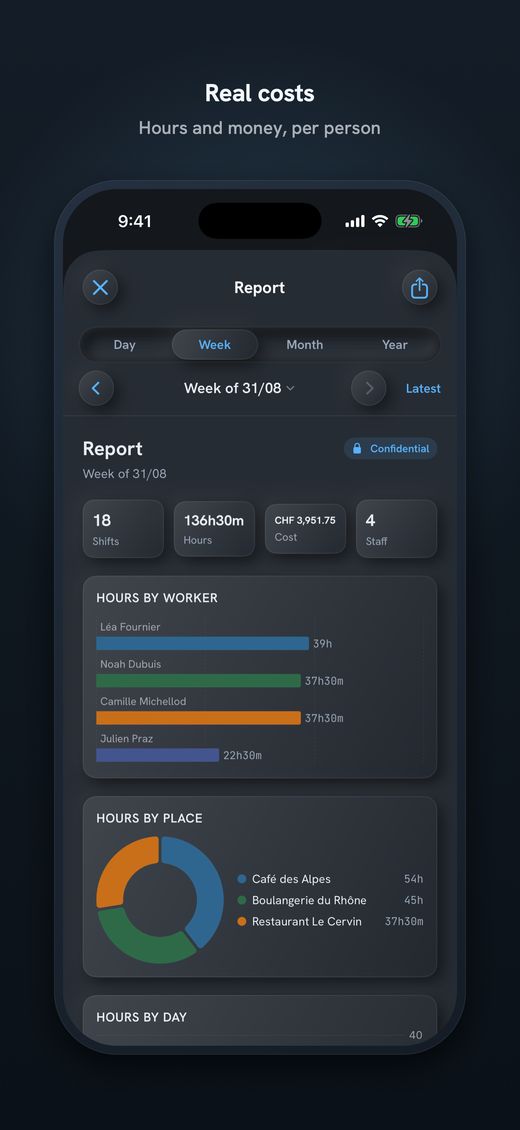
- Hours per person and per monthTo see who works how much, without a spreadsheet.
- Costs with each person's ratesThe rate per hour and per kilometre, if you entered it.
- A PDF poster to printDay, week, month or year, from A6 to A3, for the office.
Send Planning: the cleaning schedule on your iPhone
Send Planning is an app for iPhone and iPad. You make the schedule for your small team and send each person her shifts. No account, no server: the data stays on your device, and the app works offline, except for sending.
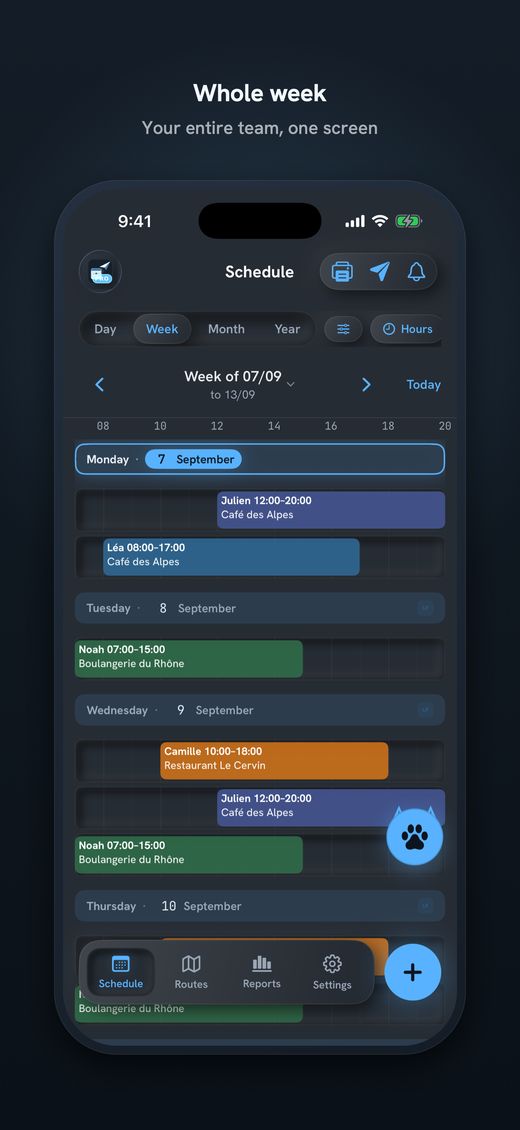
- The whole team's weekTeam members, clients, hours and break, on one screen.
- Each person gets only her shiftsBy WhatsApp, SMS, email or Share.
- Swap shiftOne long press, and two people trade places.
- Travel and kilometres (Pro)From home to the client, with Apple Maps.
- Series and days offA visit that repeats, a day off whose reason stays private.
- Stays on the iPhoneLock with Face ID or a PIN.
Free, with no time limit: 1 team member, 1 site, 1 series and 1 theme. It is for trying the app. A cleaning business with several clients and several cleaners needs Pro (unlimited team members, sites and series, travel, costs, reports, PDF poster). Subscriptions start with 14 days free; there is also a one-time payment. The price is in the App Store.

Download Send Planning for iPhone and iPad. You make the team's rota and each person gets only their own shifts, by WhatsApp, SMS or email. Free to start, no account.

Frequently asked questions
How do I make a work schedule for a cleaner?
Note each client with an address, then place each visit: the person, the day, the start and end time. Clients who come back every week are noted once, as a series. Then you send each cleaner her own visits.
Can I use the free version with several clients?
No. In Send Planning each client is a site, and the free version has just 1 team member and 1 site. It is for trying the app. With several clients and several cleaners you need Pro, which you can try free for 14 days.
How do I send each cleaner only her own visits?
When the week is ready, you send it by WhatsApp, SMS, email or Share. Each person gets only her own shifts. The reason for a day off never goes in the message, which only says "Day off".
What do I do when a cleaner is sick?
Long-press the visit and move it, or choose "Swap shift" and tap another person's visit. The day, the hours and the site stay the same. You send again, and only the people affected get a message.
How do I note a client who comes every week?
You create the visit once and repeat it: every week, on the days you choose, for example Tuesday and Friday. Other rhythms exist: every day, every two weeks, every month, every year. The free version has a single series.
Do my cleaners have to install the app?
No. There is no app for them: they get a message on WhatsApp, by SMS or by email. They have no account to create. Only you have the app, on your iPhone or iPad.
Does the app work out the month's kilometres and hours?
With Pro, yes: the app gives the kilometres and minutes from home to the client, using Apple Maps, and a report with hours and costs per person and per month. These are planned hours: there is no time clock and no wage calculation.
About this guide. Informational content. It is not legal advice: work rules, breaks and the contract of your business depend on your contract and your canton. The names, clients, times and distances in the examples are invented. This guide may contain errors or be out of date: always check the official sources. Updated in October 2026.
More guides on this topic
- Pharmacy staff schedule: the team's shifts, week by week, on your iPhone
- Send the café rota by WhatsApp – and what data protection says about it
- Restaurant schedule: lunch service, dinner service and breaks
- Print the team schedule as a PDF, from A6 to A3, to put on the wall
- Announce the shift schedule in time: plan and send two weeks ahead
- Visit scheduling for small Spitex teams: visits, routes and kilometres
- Swapping shifts in a team: swap two shifts and tell everyone
- A 7-day shift schedule without Excel: repeating shifts and days off
- Staff rota for a nursery on your iPhone: start free, no computer