Visit scheduling for small Spitex teams: visits, routes and kilometres
Create each client as a place and each carer as a team member, then enter the visits as shifts. With Pro you see the kilometres and minutes from home to the client and the cost per person. Each person gets only their own visits. The app is not care software.
Only for people who live in Switzerland.For information. This guide explains how to use Send Planning and summarises Swiss rules on work. It may contain errors or be out of date: always check the official sources (Fedlex, SECO, your canton's labour inspectorate) and, if in doubt, ask an official service for help. Not legal advice. Prices are in the App Store.
- Planning the visits
- Clients, data and limits
- Visits that repeat
- Routes and transport
- Kilometres and costs
- Swaps and sending
- The app
- Questions
How do I plan the visits of a small Spitex team?
Spitex is the Swiss name for home care and home help. Create each client as a place, each carer as a team member, and enter the visits as shifts in the week. Then you send each person only their own visits.
You do it on the iPhone, with no computer. It is meant for small, private teams of two to eight people.
Send Planning is a visit planner, not care software. It does not keep care records, has no fields for health data, does not bill health insurers and does not plan the trip from client to client. It shows who goes where and when, and what the trip from home to the client costs.
Clients as places: names, notes and data protection
Each client is a place with a name and an address. The address is needed for the route. For the name, initials or a short name are enough: “Mrs K.” instead of a full name.
Name“Mrs K.” or “Mr B.”Note“Back entrance”, “park in the yard”TimeWhen, how long, with or without a break
HealthDiagnoses, medication, test resultsCareWhat is done during the visitAccessKey codes and the like
The text of a shift goes into the message. What you write in the place name and the note reaches WhatsApp, SMS or email. Health data counts as particularly sensitive under the Swiss data protection act (FADP). The app is not meant for it: leave it out. Your data stays on the iPhone, with no server and no account, but what you send leaves the device.
Spitex is subject to cantonal rules and, depending on the organisation, its own contracts. Ask your canton, your association or your data protection officer what applies to you. The app helps you plan and inform; complying with the rules is up to the organisation.
A checklist to tick off before you send the first plan. It is saved in this browser only.
- Each client is a place. With initials and an address.
- Each person is entered. With phone or email and, for routes, their address.
- No health data in the notes. Not in the place name either.
- Each person's rate is entered. The employer sets it.
- The way of sending is agreed. WhatsApp, SMS or email, depending on the person.
Visits that repeat every week
Mrs K. gets a visit every Monday and Thursday. Create the visit once, as a weekly series with the weekdays you pick, and the app puts it into the following weeks. An end date is optional. There are also daily, fortnightly, monthly and yearly series.
- Series1 series on the free plan; as many as you need with Pro.
- Days off and absencesFrom–to, inclusive. The reason stays private and never goes into the message; it only says “Day off”.
- Conflict rulesTwo visits at the same time, or a visit on a day off: allowed, warning or conflict, as you choose in the settings.
- Public holidaysWith Pro you import them by region, for example for your canton. On the free plan you type them in.
How far is it from home to the client?
With Pro, the app measures the kilometres and minutes from each person's address to the place of each visit, using Apple Maps. You see at a glance who travels how far.
Only home to place. The app does not calculate from client to client. If you have three visits in a row in the morning, you do not see the legs between them: allow for that time yourself. With no connection, the app only gives an estimate.
Pro also records how each person gets to the visit:
- Own carThe person drives their own car.
- Car shareAnother team member drives. Handy when two people head the same way on the same morning.
- Public transportWith a ticket and a time.
Mileage cost: distance times rate
With Pro, the app works out the cost using each person's rates: per hour and per kilometre. To see how it works, here is a sum by hand, with invented numbers. Swap in your own.
Calculator for one month's travel costs
- Distance per visit, there and back (km)
- Allowance per visit (CHF)
- Allowance per month (CHF)
- Kilometres per month
12.4 km × 2 × 0.70 CHF = 17.36 CHF per visit. There and back is an assumption of this sum; how the app counts the distance, you see in its report.
The rate is the one your organisation sets. 0.70 CHF is an invented example, not an official value. In the app, enter for each person the rate you agreed with them.
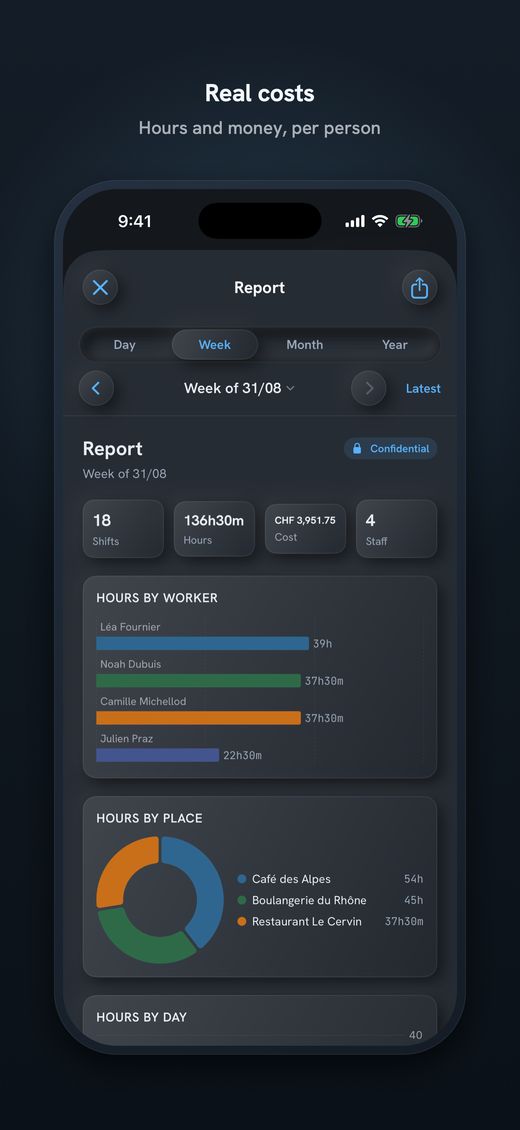
- The month's reportHours and costs per person, using each person's hourly and per-kilometre rate.
- A basis, not payrollThe app does not calculate salaries or record the hours actually worked. It shows what was planned.
When someone drops out or wants to swap
If someone is ill, you enter the absence. Depending on your rule, the app shows that day's visits as a warning or a conflict, and you see which ones need someone. If two people want to swap visits, one long press does it.
- Long presson Lea's visit
- “Swap shift”choose
- TapMarco's visit
Only the people swap. The day, the hours and the place stay the same. If the visit was already sent, the person who loses it gets the notice in the next send.
Then you send. Each person gets only their own visits, by WhatsApp, SMS, email or Share. Your team members do not need an app.
Mon (02/11): 07:00–09:00 (no break) • Mrs K. Thu (05/11): 07:00–09:00 (no break) • Mrs K.
✓ SentMon (02/11): 08:00–10:00 (no break) • Mr B. Fri (06/11): 08:00–09:30 (no break) • Mrs R.
✓ Sent- Automatic emailAt the time you set, from your own account (Google or SMTP). The app has no email server.
- CalendarIf you like, as an .ics file, by email or Share.
- Poster (Pro)The plan as a PDF, A6 to A3, for the day, week, month or year. Do not pin it up where third parties can read the clients' initials.
Send Planning for small Spitex teams
An app for iPhone and iPad, with no account and no server. Your team members get their visits as a message.
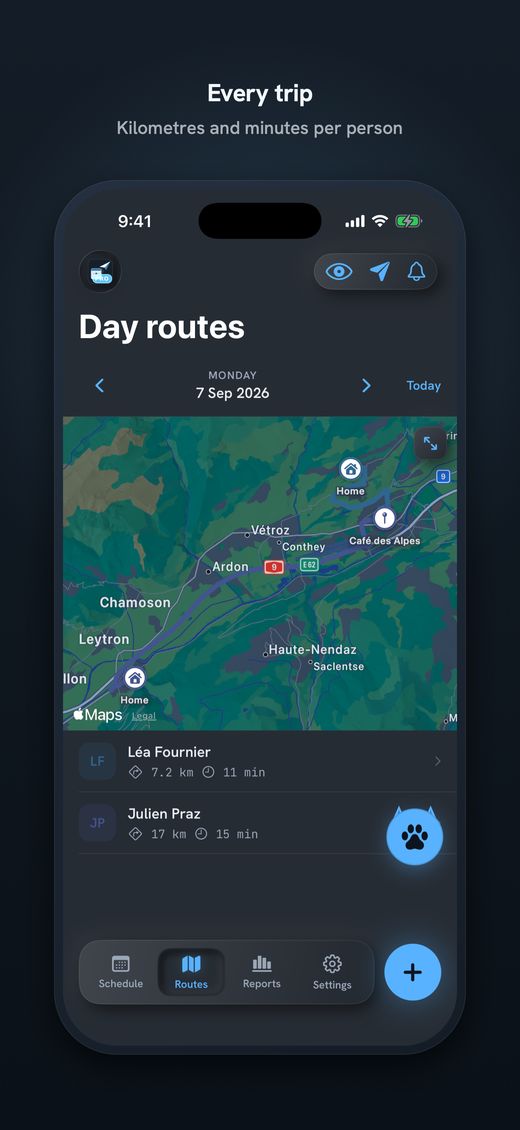
- Routes (Pro)Kilometres and minutes from home to the place, using Apple Maps.
- Costs (Pro)With each person's hourly and per-kilometre rate, in the month's report.
- Series and days offVisits that repeat are created once; absences stay private.
- Swaps and sendingSwap shifts; each person gets only their own visits.
- Data on the deviceLock with Face ID or PIN. The app works offline, except for sending.
Free with no time limit, but only to try it out: 1 team member, 1 place and 1 series. A team with several clients needs Pro (routes, costs, transport, reports, poster, unlimited team members, places and series). Subscriptions start with 14 days free; they are weekly, monthly or annual, and there is also a one-time payment. The price is on the App Store.

Download Send Planning for iPhone and iPad. You make the team's rota and each person gets only their own shifts, by WhatsApp, SMS or email. Free to start, no account.

Frequently asked questions
Is Send Planning software for care documentation?
No. The app is a visit planner. It keeps no care records, has no fields for health data and does not bill health insurers. It plans who visits which client and when, and sends each person their own visits.
May I enter my clients' names?
Initials or a short name are better, for example “Mrs K.”. The text of a shift goes into the WhatsApp, SMS or email message. Health data does not belong in place names or notes. Ask your canton or data protection contact what applies to you.
Does the app work out the route from client to client?
No. With Pro, it measures kilometres and minutes from each person's address to the place of each visit, using Apple Maps. You do not see the legs between two visits on the same morning. With no connection, the app only gives an estimate.
How do I work out mileage costs for the team?
Enter each person's hourly and per-kilometre rate, as set by your organisation. The monthly report then shows hours and costs per person. It is a planning basis: the app does not calculate salaries or record the hours actually worked.
What do I do when someone is ill?
Enter the absence; the reason stays private and is not in the message. Depending on your rule, the app shows that day's visits as a warning or a conflict. To swap, hold a visit, choose “Swap shift” and tap the other person's.
Is the free version enough for a Spitex team?
It is for trying the app: 1 team member, 1 place and 1 series. A team with several clients needs Pro. Subscriptions start with 14 days free, and there is also a one-time payment. The price is on the App Store.
Do my team members need an app?
No. They receive their visits by WhatsApp, SMS or email, as text or an image. By email or Share you can also add an .ics file for their calendar.
About this guide. Informational content. Not legal, data protection or tax advice. Names, times, distances and rates are invented. Spitex is subject to cantonal rules and, depending on the organisation, its own contracts; the data protection laws are on Fedlex. This guide may contain errors or be out of date: always check the official sources. Updated October 2026.
More guides on this topic
- Cleaning: note your clients and hours on the iPhone, and send each team member her schedule, with no paper and no Excel
- Pharmacy staff schedule: the team's shifts, week by week, on your iPhone
- Send the café rota by WhatsApp – and what data protection says about it
- Restaurant schedule: lunch service, dinner service and breaks
- Print the team schedule as a PDF, from A6 to A3, to put on the wall
- Announce the shift schedule in time: plan and send two weeks ahead
- Swapping shifts in a team: swap two shifts and tell everyone
- A 7-day shift schedule without Excel: repeating shifts and days off
- Staff rota for a nursery on your iPhone: start free, no computer