Announce the shift schedule in time: plan and send two weeks ahead
As a rule, you should announce a new schedule two weeks before the first shift (Art. 69 ArGV 1). Here is how to count back from the first working day and send the schedule to each person.
Only for people who live in Switzerland.For information. This guide explains how to use Send Planning and summarises Swiss rules on work. It may contain errors or be out of date: always check the official sources (Fedlex, SECO, your canton's labour inspectorate) and, if in doubt, ask an official service for help. Not legal advice. Prices are in the App Store.
- How early?
- What the law says
- Sending the schedule
- Changes after sending
- Planning far ahead
- The app
- Questions
How early do I have to announce the shift schedule?
As a rule, two weeks before the first shift under a new schedule. This is in Art. 69 ArGV 1 (Ordinance 1 to the Labour Act): employees are consulted when the schedule is planned and informed as early as possible.
An example: the new week starts on Monday, 16 November. Then everyone should have the schedule by Monday, 2 November at the latest. Always count 14 days back from the first working day.
The schedule is a promise to your team. People who know two weeks ahead can arrange childcare, travel and their private lives. The law says “as a rule”; also check your collective labour agreement (GAV/CCT).
What do Art. 69 ArGV 1 and Art. 47 ArG say?
Ordinance 1 to the Labour Act (ArGV 1) regulates how working hours are planned. Two articles matter for the schedule.
GAV/CCTA collective labour agreement can have its own rules, for example in hospitality or careCantonCantons and sectors sometimes have their own rulesContractYour employment contract and company rules can go furtherShort noticeIf someone drops out, the notice is shorter: inform them as early as you can
“As a rule” does not mean “always”. The app helps you plan and inform. Complying with the law remains the employer's responsibility.
Sending the schedule: right now, or at a set time
You can send a schedule straight away. Or you set when the emails go out, for example every second Monday at 8 a.m. Each person gets only their own shifts.
- Connect your accountOnce: your Gmail account or another account via SMTP
- Finish the scheduleEnter and check the shifts of the week
- Pick the day and timeWhen the email should go out
- The app sendsFrom your own account, at the set time
Mon (16/11): 08:00–12:00 (no break) • Café Central Wed (18/11): 13:00–17:00 (15 min break) • Café Central
✓ SentTue (17/11): 08:00–12:00 (no break) • Café Central Thu (19/11): 08:00–12:00 (no break) • Café Central Sat (21/11): 09:00–13:00 (no break) • Café Central
✓ SentThe scheduled send goes out from your own account: Gmail with the minimal permission (gmail.send) or SMTP with an app password. Alpine Lynx has no email server, and the app tries to send at the set time. WhatsApp and SMS cannot be sent on their own: the app opens the program and you tap send.
And if something changes after sending?
It happens. There are two cases, and the app handles them differently.
If the shift was already sent, the person who loses it gets the notice in the next send.
Long-press a shift, “Swap shift”, then tap the other person's shift. The day, the hours and the place stay the same; only the people change.
Put the shift on another day or at another time. If it was already sent, the next message adds an addendum: old → new.
The app notifies nobody on its own. The notice and the addendum go in the next message you send. For a last-minute change, it is better to tell the person right away.
Planning far ahead: repeating series, days off, routes and poster
Two weeks is the minimum, not the goal. If you plan the whole month, you have less stress. An example week:
What repeats, you create only once. A series repeats daily, weekly (on the weekdays you choose), every two weeks, monthly or yearly, with an end date if you like.
- Repeating seriesThe free plan has 1 series; Pro has no limit.
- Days offFrom–to, inclusive. The reason stays private and never goes in the message, which says only “Day off”.
- Routes (Pro)Kilometres and minutes from home to the place, calculated with Apple Maps.
- PDF poster (Pro)A6 to A3, for the day, week, month or year: to print and put up.
Send Planning: the schedule on your iPhone
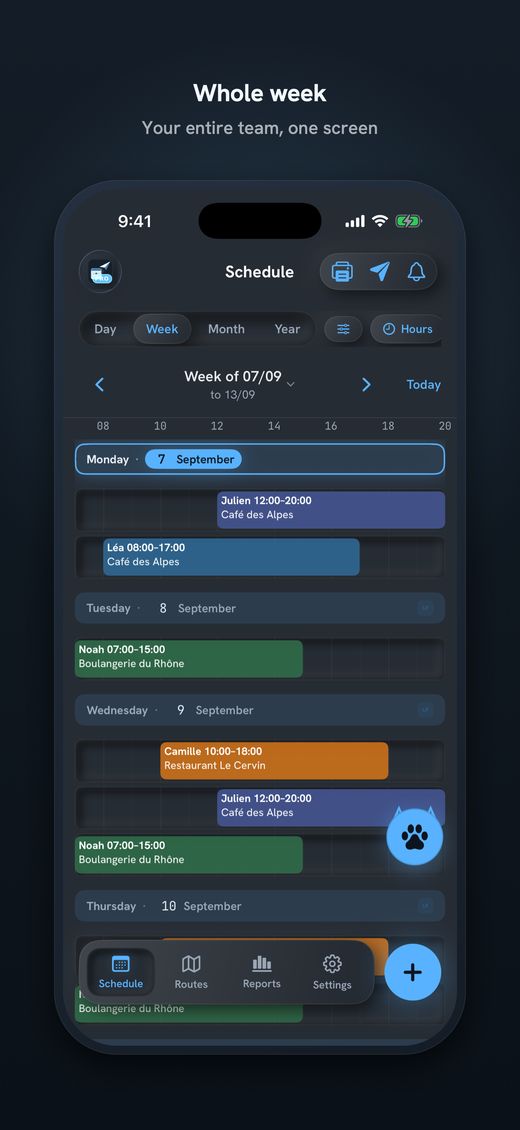
- Weekly scheduleShifts per person and place, with warnings for conflicts.
- One send per personBy WhatsApp, SMS, email or Share, as text, image or .ics.
- Scheduled emailFrom your own account, on the day and at the time you set.
- Swap shiftsWith a long press; notice in the next send.
- Data on your iPhoneNo account, no server of mine. Only what you send leaves the device.
Free, with no time limit: 1 team member, 1 place, 1 series and 1 theme, to try it out. A whole team needs Pro: 14 days free on the subscriptions, then weekly, monthly, annual or a one-time payment. The price is on the App Store. In the free plan the message ends with “Sent with Send Planning by Alpine Lynx”.

Download Send Planning for iPhone and iPad. You make the team's rota and each person gets only their own shifts, by WhatsApp, SMS or email. Free to start, no account.

Frequently asked questions
How early do I have to announce the shift schedule?
As a rule, two weeks before a shift under a new schedule (Art. 69 ArGV 1). Employees are consulted when the schedule is planned and informed as early as possible. Count 14 days back from the first working day.
Does the two-week period always apply?
No, it is a rule and not an absolute value. A collective labour agreement, your canton or your employment contract can have their own rules. Check them, and for last-minute changes inform people as early as you can.
How do I schedule the sending of shifts by email?
Connect your Gmail account or an SMTP account once and set the day and time. The app then tries to send at that time from your own account. Each person gets only their own shifts.
Can the app send WhatsApp or SMS automatically?
No. For WhatsApp and SMS the app only opens the program and you tap send yourself. Only the email send can run at a set time.
What happens if I change the schedule after sending?
If you swap a shift that was already sent, the person who loses it gets a notice in the next send. If you move it, the next message adds an addendum (old → new). The app notifies nobody on its own.
How do I put the schedule up at work?
With Pro you export the schedule as a PDF poster from A6 to A3, for the day, week, month or year, and print it. Under Art. 47 ArG, the employer informs staff of working hours by posting them or in another suitable way.
About this guide. Informative content, not legal advice. The names, times and businesses in the examples are invented. The articles cited (Art. 69 ArGV 1, Art. 47 ArG) link to the official text on Fedlex. Check your collective labour agreement and your canton. This guide may contain errors or be out of date: confirm everything in the official sources. Updated October 2026.
More guides on this topic
- Cleaning: note your clients and hours on the iPhone, and send each team member her schedule, with no paper and no Excel
- Pharmacy staff schedule: the team's shifts, week by week, on your iPhone
- Send the café rota by WhatsApp – and what data protection says about it
- Restaurant schedule: lunch service, dinner service and breaks
- Print the team schedule as a PDF, from A6 to A3, to put on the wall
- Visit scheduling for small Spitex teams: visits, routes and kilometres
- Swapping shifts in a team: swap two shifts and tell everyone
- A 7-day shift schedule without Excel: repeating shifts and days off
- Staff rota for a nursery on your iPhone: start free, no computer