Restaurant schedule: lunch service, dinner service and breaks
Build one schedule per service, lunch and dinner, with kitchen and floor. Keep an eye on split shifts, breaks (Art. 15 ArG) and the 11 hours of rest (Art. 15a ArG), then send each person their own shifts.
Only for people who live in Switzerland.For information. This guide explains how to use Send Planning and summarises Swiss rules on work. It may contain errors or be out of date: always check the official sources (Fedlex, SECO, your canton's labour inspectorate) and, if in doubt, ask an official service for help. Not legal advice. Prices are in the App Store.
- Lunch and dinner at a glance
- The split shift
- Breaks and rest
- Kitchen and floor
- The Saturday night swap
- Sending to each person
- In Send Planning
- Questions
How do you make the schedule for a restaurant with a lunch service and a dinner service?
Build one schedule per service: lunch on one side, dinner on the other. Each person has one or two shifts a day, and the schedule says who is in, at what time and where (kitchen or floor).
Three things throw a restaurant schedule off fast: the split shift, the breaks, and the rest between closing at night and opening the next morning. This guide takes them one by one, then shows how to send each person their own shifts from your iPhone, no Excel needed.
The split shift: lunch service, gap, dinner service
Lea works lunch, goes home for a rest, then comes back for dinner. On one day that makes two shifts with a gap in the middle. Here are two days on a ruler from 8 a.m. to midnight.
In the app, a split shift is two shifts on the same day for the same person. To see what it comes to in hours, type in yours:
Split-day calculator
- Working time
- h
- From first to last hour
- h
- Minimum break (Art. 15 ArG)
- min
The gap is longer than the minimum break. It can count as the break if the person is free to leave the premises.The minimum break is longer than the gap. Plan a break inside one of the two shifts.
A gap is not always a break. If the person cannot leave the workplace, that time counts as working time (Art. 15 ArG). The national collective agreement for restaurants may also have its own rules for the gap: check it.
Breaks and rest: what the law says
Two articles of the Swiss Labour Act (ArG) matter most for a restaurant. The figures below are the law's; the collective agreement and your canton can go further.
Over 5½ hA break of at least ¼ hOver 7 hA break of at least ½ hOver 9 hA break of at least 1 hNot free to leaveIf the person cannot leave their post, the break counts as working time
11 h in a rowBetween the end of one working day and the start of the nextOnce a weekFor an adult, rest can drop to 8 h if the average over two weeks is 11 hWho closes, who opensThe typical case: closing at midnight and opening the next morning
Closing at 00:30, opening the next day at 07:30: 7 hours of rest. That is 4 hours short.
Closing at 00:30, starting at 11:30 with the lunch service: 11 hours of rest.
In hotels and restaurants there is a national collective agreement (CCNT in French, L-GAV in German) with rules of its own. Check it, and your canton: this guide does not give its numbers.
Send Planning does not check the 11 hours. The app flags two shifts that overlap and a shift on a day off; the rest between night and morning is something you check on the schedule yourself. The app helps you plan; the employer is the one who complies with the law.
Kitchen and floor over one week
Marco and Lea are in the kitchen, Sofia and Rui on the floor. Monday is the closing day. Each person has lunch shifts, dinner shifts or both, and at least one day off.
Shifts that come back every week, you enter once: a weekly series with the days you choose (Tuesday, Wednesday, Friday...). It can also be daily, every two weeks, monthly or yearly, with an end date if you like. The free plan has 1 series; Pro has no limit.
A day off or an absence is entered from one day to another. The reason stays private and is never in the message; the message only says it is a day off. If you put a shift on a day off, the app warns you.
The Saturday night swap
Sofia is on the floor on Friday night, Rui on Saturday night. They would rather switch. You do not have to redo everything: the day, the hours and the place stay the same, only the people change.
If the shift had already been sent, the person who loses it gets a notice in the next send.
- Long presson Sofia's shift
- Swap shiftin the menu that opens
- TapRui's shift, then confirm
The swap is done by you, in the app, once the two agree: the app does not ask them to approve it and sends them nothing until you send. After a swap, check each person's 11 hours of rest.
Sending each person their shifts
Each person receives only their own shifts, never everyone's schedule. You send by WhatsApp, SMS, email or Share (the iPhone share sheet), as text, as an image or as a .ics calendar file (by email and Share).
Tue (03/NOV): 11:00–14:30 (no break) • Lakeside Restaurant Tue (03/NOV): 18:00–22:30 (no break) • Lakeside Restaurant
✓ SentTue (03/NOV): 09:00–14:30 (no break) • Lakeside Restaurant Tue (03/NOV): 17:30–22:00 (no break) • Lakeside Restaurant
✓ SentBy email, the app can send on its own at the time you set, from your own account (Google or SMTP). If you move a shift that was already sent, the next message adds an addendum: old time, new time. The message template can be customised (restaurant name, period).
Give notice in time. For a new schedule, Ordinance 1 to the Labour Act asks you to consult the staff and to inform them as early as possible, as a rule two weeks ahead (Art. 69 of that ordinance). Check what the collective agreement says.
Send Planning in a restaurant
Send Planning is an iPhone and iPad app for making the schedule of a small team and sending each person their shifts. It does not replace the collective agreement or a till system: it is for planning and informing.
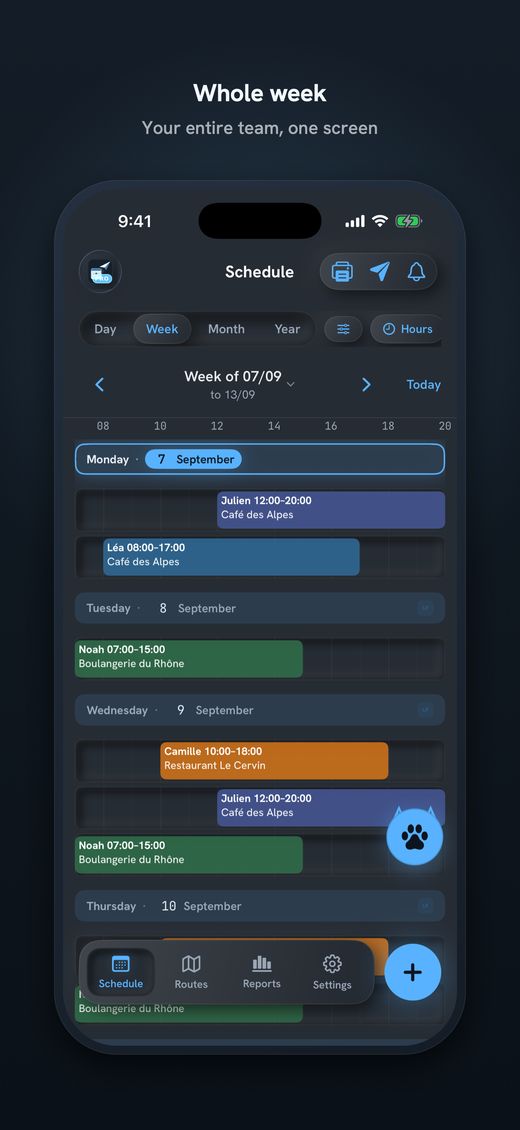
- Split shiftsTwo shifts on the same day for the same person, with a break in minutes if you plan one. Duplicate, move or delete a shift with a long press.
- Shift swapsLong press, “Swap shift”, then the other person's shift. The day, the hours and the place do not move.
- Sending to each personWhatsApp, SMS, email or Share. Each person only sees their own shifts.
- Days off and seriesDays off (from–to) with a private reason; series that repeat. Public holidays by region with Pro, by hand in the free plan.
- Routes (Pro)For catering or an extra job at a client's home: the kilometres and minutes from the person's home to the place, with Apple Maps, and the shift's transport (car, lift, public transport).
- PDF poster (Pro)The schedule for the day, week, month or year in A6, A5, A4 or A3, to pin up in the kitchen or at the dish station.
- On your iPhone, no accountNo account and no developer server. The data stays on the device; you only need a network to send.
Free, with no time limit, to try with 1 employee, 1 place and 1 series. A real restaurant team needs Pro (unlimited places, employees and series, routes, PDF posters, hours and cost reports, no brand line). Subscriptions start with 14 free days; there is also a one-time payment. The price is in the App Store.

Download Send Planning for iPhone and iPad. You make the team's rota and each person gets only their own shifts, by WhatsApp, SMS or email. Free to start, no account.

Frequently asked questions
How do I make a split shift in Send Planning?
Create two shifts on the same day for the same person: one for lunch, one for dinner. If the same pattern comes back every week, use a weekly series with the days you choose. The free plan has 1 series; Pro has no limit.
What break does a 9.5-hour day need?
Under Art. 15 ArG, more than 9 hours of work gives a break of at least one hour. If the person cannot leave the workplace, the break counts as working time. Check the collective agreement too.
How many hours of rest between closing and opening?
At least 11 hours in a row between two working days (Art. 15a ArG). For an adult it can drop to 8 hours once a week, if the average over two weeks is 11 hours. The collective agreement and your canton may set other rules.
Does Send Planning check the 11 hours of rest?
No. The app flags two overlapping shifts and a shift on a day off, and in the settings you choose whether that is allowed, a warning or a conflict. The rest between night and morning is something you check on the schedule yourself.
How do I swap the Saturday night shift?
Hold your finger on one of the shifts, choose “Swap shift”, then tap the other person's shift. The day, the hours and the place stay the same, only the people change. If the shift had been sent, the person who loses it gets a notice in the next send.
Does my team get the whole schedule?
No. Each person receives only their own shifts, by WhatsApp, SMS, email or Share. They do not need an app: they read a message. The reason for a day off is never in the message.
What does the restaurant collective agreement say?
There is a national collective agreement (CCNT in French, L-GAV in German) with its own rules. This guide does not give them: check it, and your canton, before you fix your schedules.
About this guide. Informational content, not legal advice. The examples (names, times, restaurant) are made up. The articles cited are from the Swiss Labour Act (ArG) and its Ordinance 1 (ArGV 1); each links to the official text on Fedlex. In the restaurant trade, the collective agreement and your canton may set other rules. This guide may contain errors or be out of date: always check the official sources. Updated in October 2026.
More guides on this topic
- Cleaning: note your clients and hours on the iPhone, and send each team member her schedule, with no paper and no Excel
- Pharmacy staff schedule: the team's shifts, week by week, on your iPhone
- Send the café rota by WhatsApp – and what data protection says about it
- Print the team schedule as a PDF, from A6 to A3, to put on the wall
- Announce the shift schedule in time: plan and send two weeks ahead
- Visit scheduling for small Spitex teams: visits, routes and kilometres
- Swapping shifts in a team: swap two shifts and tell everyone
- A 7-day shift schedule without Excel: repeating shifts and days off
- Staff rota for a nursery on your iPhone: start free, no computer