Send the café rota by WhatsApp – and what data protection says about it
Posting the whole rota in the WhatsApp group shows everyone's hours to everyone. The data protection law asks about proportionality: each person needs only their own shifts. Here is a simpler and more discreet way.
Only for people who live in Switzerland.For information. This guide explains how to use Send Planning and summarises Swiss rules on work. It may contain errors or be out of date: always check the official sources (Fedlex, SECO, your canton's labour inspectorate) and, if in doubt, ask an official service for help. Not legal advice. Prices are in the App Store.
- The short answer
- What everyone sees in the group
- What the law says
- Each person gets only their shifts
- Choosing the channel and telling the team
- Swaps and changes
- With Send Planning
- Questions
Can I post the rota in the WhatsApp group?
The data protection law does not ban a WhatsApp group by name. But it asks one question: does each person need everything they see in the group? For a rota, the answer is usually no. Each person needs their own shifts.
The plan for the whole team shows everyone's names and hours, sometimes days off and their reasons too. If you send each person only their own shifts, the problem never starts.
What everyone sees in the group
An example: Café Central, with three team members. The week's plan goes into the group. This is how each person sees it:
Everyonesees everyone's hoursDays offare visible to allReasonslike "doctor's appointment" quickly end up in the group chatLeavingSomeone who leaves the team still has the chat history
Their ownOnly that person's shiftsDay offThe message says only "Day off", never the reasonPrivateNobody learns anyone else's hoursClearNo long message where you hunt for your own line
What the law says about rotas and data protection
Since 1 September 2023, Switzerland has had the revised Federal Act on Data Protection (FADP). A person's name and working hours are personal data. For employees there is also a rule in the Code of Obligations. The articles that matter here:
Art. 328b COThe employer may process data about employees only if it concerns their suitability for the job or is needed to carry out the employment contractArt. 6 FADPProportionality and purpose: process only what is necessary for the purposeArt. 8 FADPData security: appropriate measures against unauthorised accessArt. 19 FADPDuty to inform: tell the people concernedArt. 16 FADPDisclosure abroad: special rules apply
The idea behind it. For the purpose "who works when?", each person needs their own hours. They do not need the hours and days off of the others. That is the proportionality of Art. 6 FADP, applied to the rota.
This guide explains what the articles say. It does not say whether your business is doing anything wrong. If in doubt, the Federal Data Protection and Information Commissioner (FDPIC) or an employment law specialist can help.
Each person gets only their own shifts
The simple solution: one message per person. With Send Planning it looks like this (example, messages shortened):
Mon (02 Nov): 07:00–13:00 (30 min break) • Café Central Tue (03 Nov): 07:00–13:00 (30 min break) • Café Central Fri (06 Nov): 07:00–13:00 (30 min break) • Café Central Sat (07 Nov): 08:00–14:00 (30 min break) • Café Central
✓ SentMon (02 Nov): 13:00–19:00 (30 min break) • Café Central Thu (05 Nov): Day off Sat (07 Nov): 08:00–14:00 (30 min break) • Café Central Sun (08 Nov): 08:00–14:00 (30 min break) • Café Central
✓ SentWed (04 Nov): 07:00–13:00 (30 min break) • Café Central Thu (05 Nov): 07:00–13:00 (30 min break) • Café Central Fri (06 Nov): 13:00–19:00 (30 min break) • Café Central Sun (08 Nov): Day off
✓ SentThe reason stays private. In the app, for an absence, you can write a reason if you want, for example as a reminder for yourself. It never goes in the message. Team members receive only "Day off".
Choosing the channel and telling the team
WhatsApp belongs to Meta: it is a third-party service. That is not an accusation, it is a fact worth knowing. Many teams use WhatsApp because everyone has it. You choose the channel for the rota, as the owner of the business: WhatsApp, SMS or email.
- Choose the channelWhatsApp, SMS or email, per person
- Tell the teamSay which channel you use for the plan and why
- Send only what is theirsOne message per person
- Lock the appWith Face ID or a PIN
One sentence at the start is enough to inform them, for example: "You will each get the rota separately on WhatsApp. If you would rather have SMS or email, tell me." This fits the duty to inform (Art. 19 FADP): the team knows which data goes through which channel. For data security (Art. 8 FADP), a locked phone counts too.
If a channel sends data abroad (Art. 16 FADP), special rules apply. If you are unsure, ask the FDPIC. This is true of any third-party service, not only WhatsApp.
Swaps and changes without everyone seeing everything
Marco wants to work on Friday and Lea on Saturday? With "Swap shift" only the people swap. The day, the hours and the place stay the same.
If the shift was already sent, the person who loses it gets a notice in the next send.
- Hold your fingeron Lea's shift
- Choose "Swap shift"
- TapMarco's shift
- SendEach person gets only their own change
Moving a shift that was already sent is also added as an addendum to the next message (old, new). Only the person affected reads it. The rest of the group does not need to know.
The café rota with Send Planning
Send Planning is an app for iPhone and iPad. You set up the shifts, the app sends each person only their own. No account, no server of the developer: the data stays on your device.
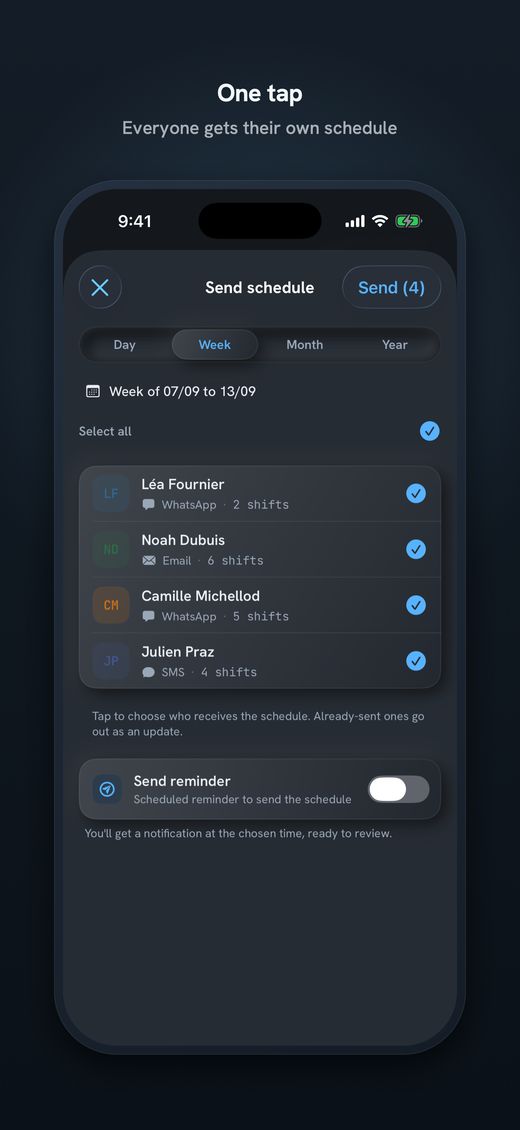
- One message per personBy WhatsApp, SMS, email or Share. As text or image, and by email and Share also as a calendar file.
- Days offAbsences from–to. The reason stays in the app; the message says only "Day off".
- Repeating seriesA shift that repeats (daily, weekly, every two weeks) is set up only once. For example, every Saturday.
- Swap shiftHold, swap, done.
- Routes (Pro)Kilometres and minutes from home to the place, with Apple Maps.
- PDF poster (Pro)The day, week, month or year to put up, from A6 to A3. For the kitchen or the staff room.
- The data stays on the iPhoneNo account. You lock the app with Face ID or a PIN. Sending needs a connection.
Free with no time limit, to try it out: 1 team member, 1 place, 1 series. A whole team needs Pro. The subscriptions have 14 days free; there are weekly, monthly and annual ones, plus a one-time payment. The price is on the App Store. In the free version the message ends with "Sent with Send Planning by Alpine Lynx"; with Pro you can remove it.

Download Send Planning for iPhone and iPad. You make the team's rota and each person gets only their own shifts, by WhatsApp, SMS or email. Free to start, no account.

Frequently asked questions
Is a rota in the WhatsApp group banned?
The law does not mention WhatsApp groups. It does require that only what is necessary is processed (Art. 6 FADP) and, for employees, only what belongs to the employment (Art. 328b CO). Whether a specific case is fine, this guide cannot say. If in doubt, the FDPIC can help.
What is the simplest alternative to a group plan?
Each person gets their own message with their shifts. Nobody sees anyone else's hours. Send Planning does this by WhatsApp, SMS or email.
Can the reason for a day off be in the message?
Better not. The reason, such as a doctor's appointment, is very personal. In Send Planning it stays in the app; the message says only "Day off".
Do I have to tell the team about the channel?
It is a good idea and fits the duty to inform (Art. 19 FADP). One sentence is enough: which channel you use for the rota, and that each person gets only their own shifts.
Is WhatsApp a problem because it belongs to Meta?
WhatsApp is a third-party service. As the owner, you choose the channel; SMS and email are alternatives. Special rules apply to disclosure of data abroad (Art. 16 FADP).
Does Send Planning data go to a server?
No. There is no account and no server of the developer. The data stays on your iPhone or iPad. Only what you send yourself leaves it.
What does it cost to plan a whole café with it?
The free version is for trying it out, with one team member and one place. A whole team needs Pro, which has 14 days free on subscriptions. The price is on the App Store.
About this guide. Informational content, not legal advice. The names, hours and café are invented. It cites the Federal Act on Data Protection (FADP) and Art. 328b of the Code of Obligations; the articles lead to the official text on Fedlex. The app helps you plan and inform; complying with the law is up to the employer. This guide may contain errors or be out of date: always check the official sources. If in doubt, ask the FDPIC. Updated in October 2026.
More guides on this topic
- Cleaning: note your clients and hours on the iPhone, and send each team member her schedule, with no paper and no Excel
- Pharmacy staff schedule: the team's shifts, week by week, on your iPhone
- Restaurant schedule: lunch service, dinner service and breaks
- Print the team schedule as a PDF, from A6 to A3, to put on the wall
- Announce the shift schedule in time: plan and send two weeks ahead
- Visit scheduling for small Spitex teams: visits, routes and kilometres
- Swapping shifts in a team: swap two shifts and tell everyone
- A 7-day shift schedule without Excel: repeating shifts and days off
- Staff rota for a nursery on your iPhone: start free, no computer